
Updated September 29, 2026
MET means you passed a requirement: every small check inside it holds, and you can show proof of each one. Miss one check and the whole requirement fails, at 20 people or 2,000. There's no lighter version for small companies. What's lighter at 20 people is the list of things to check.
Some context. CMMC is the Defense Department's cybersecurity certification for contractors that handle CUI (controlled unclassified information: the drawings, specs, and technical data the government marks as sensitive). An assessor grades you on 110 requirements, each one MET or NOT MET, and every NOT MET subtracts its point value from a perfect 110. Below 88, you can't get even the conditional result that keeps you eligible for new awards (32 CFR 170.21).
Here is one requirement worth 5 points, start to finish.
The requirement: only approved people, programs, and devices get in
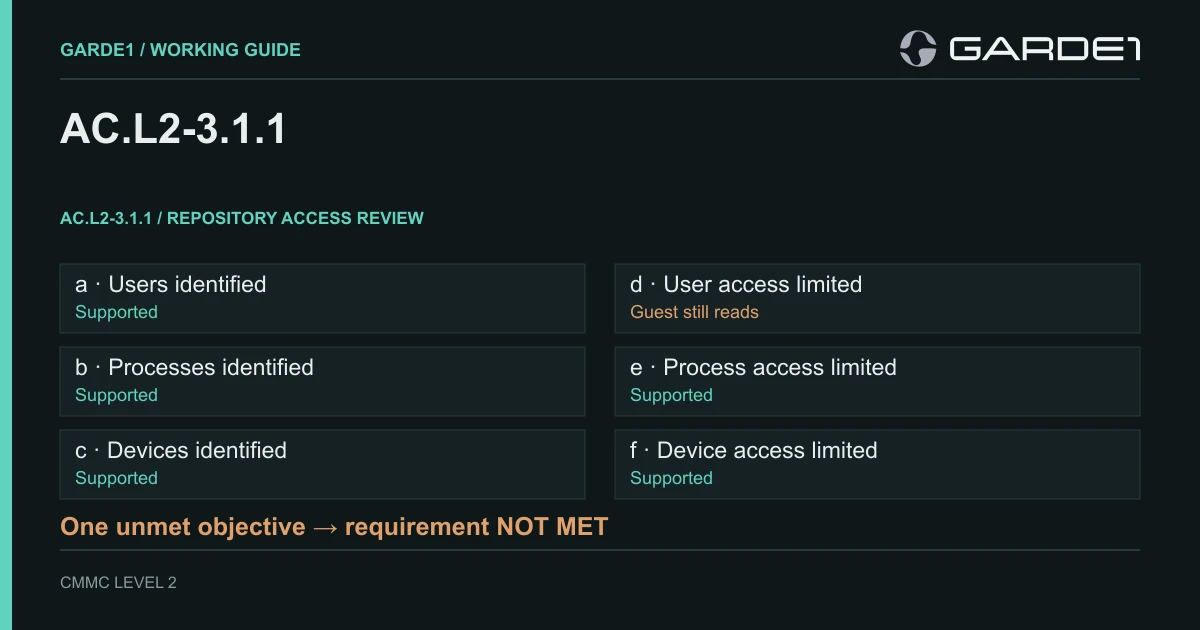
The official wording is "limit system access to authorized users, processes acting on behalf of authorized users, and devices (including other systems)." The assessor's guide, NIST SP 800-171A, splits it into six checks, called objectives. Three ask whether you've written down who and what is approved. Three ask whether access is actually limited to exactly those.
The shop has 20 people and one place where controlled drawings live, a SharePoint site (a shared file library in Microsoft 365) called PROJECT-A. Seven engineers and one administrator are approved. A nightly backup program reads the site through its own account, called a service account. Company laptops are on the device list and enrolled in Intune, Microsoft's device management. During the quarterly access review, the engineering manager spots guest-02: an outside engineer whose subcontract ended in June. guest-02 can still open PROJECT-A.
| Check | In plain words | What the shop showed | Result |
|---|---|---|---|
| [a] | Do you know who's approved? | User list with who approved each person, and when | Met |
| [b] | Do you know which programs act for people? | The backup service account, its owner, and its purpose | Met |
| [c] | Do you know which devices are approved? | Device list, including the backup server | Met |
| [d] | Can only approved people get in? | The site's permission list shows guest-02 can still read it | Not met |
| [e] | Can only approved programs get in? | Service-account permissions, plus a test program that tried to connect and was refused | Met |
| [f] | Can only approved devices get in? | A sign-in rule requires an Intune-managed laptop; an unmanaged one was tested and blocked | Met |
So the requirement is NOT MET, and the score drops by 5. Five of six earns nothing. The CMMC Level 2 Assessment Guide requires every objective to pass (or not apply) before the requirement passes, and 32 CFR 170.24 deducts the full value. How scoring works
Look at what [e] and [f] took. A backup success log shows the job ran. It says nothing about whether anything else can get in, so each one needed a test that was supposed to fail, and did.
Fixing guest-02
The first instinct is to delete guest-02 from the company directory and move on. That can leave a permission granted directly on the site, a sharing link someone sent in May, or a session that's still signed in. The fix that holds takes about an hour.
The administrator removes guest-02's permission on PROJECT-A, checks the site's sharing links and groups for any other way in, and signs guest-02 out of every open session. Then someone tries to open a test file as guest-02 and gets refused. An engineer confirms they can still open their drawings. Last, the administrator exports the site's full permission list again, and the reviewer scores [d] against that new list.
A "ticket closed" screenshot shows none of that. If the new list still shows an old sharing link, [d] stays open.
With every check holding, the requirement is MET for PROJECT-A. A mock assessment worth paying for repeats that for every system in scope. Giving people only the access they need ("least privilege," worth 3 points) is scored separately.
What goes in the folder
The policy paragraph that says who approves access. The dated user list and device list. The permission lists from before and after. The two tests that were supposed to fail. The guest-02 finding and its fix. One sentence per check explaining the result. What makes evidence count
That fits in one folder, and nobody needs to remember the story to follow it.
Reading the assessor's labels
Assessors and IT people will call this requirement AC.L2-3.1.1: access control (AC), Level 2, requirement 3.1.1 of NIST SP 800-171. The checks are its objectives [a] through [f]. The laptop rule in [f] is a Conditional Access policy in Microsoft Entra that requires a compliant device. Least privilege is 3.1.5. When your MSP says "we failed 3.1.1[d]," this is the conversation they mean.
In Garde1, the site-permission export you upload is scored on objective [d]. A guest who still has access comes back as a NOT MET finding that cites that export, and it stays open until a clean export clears it.