
Updated September 29, 2026
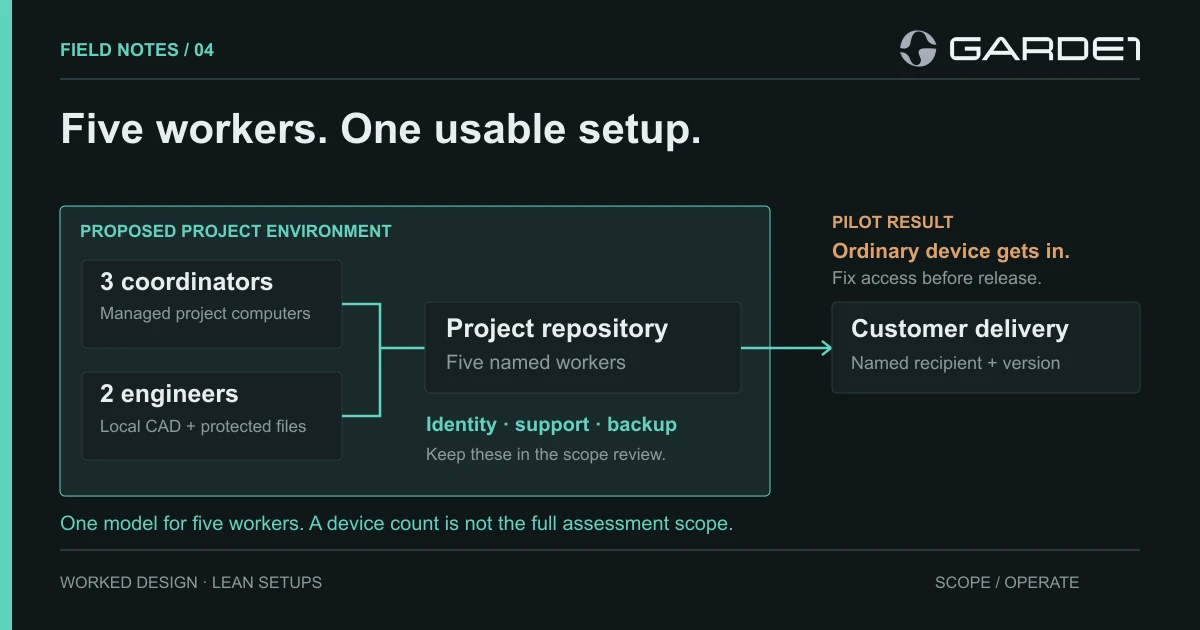
If five of your forty people touch CUI, buy the government version of Microsoft 365 for those five and leave everyone else where they are. Give the five their own managed computers, one project site, and one way to send files out.
CUI is controlled unclassified information: the drawings, specs, and technical data a defense customer marks as sensitive. This company had received a quote to move all forty employees onto GCC High, Microsoft's most restricted government cloud, which costs more per seat than the ordinary version. That quote was solving a problem the other thirty-five people don't have. Everything the five use also gets inspected in the CMMC assessment (the Defense Department's cybersecurity certification), so a smaller footprint is a smaller assessment too.
Three coordinators mark up customer documents, and two engineers edit models in a desktop CAD application. All five work in the office. The company's MSP (managed service provider, its outside IT firm) already manages the Windows laptops through Intune, Microsoft's device-management service. (If some of yours are Macs, the Mac pairing note covers them.)
Which Microsoft cloud
The standard defense clause on protecting CUI, DFARS 252.204-7012, includes rules about reporting incidents. Microsoft commits to those terms in its government clouds, GCC and GCC High, and not in commercial Microsoft 365 (Microsoft: DFARS). So the CUI can't stay in the company's ordinary account, which Microsoft calls a tenant.
Which government cloud comes down to the drawings. Technical drawings are usually Controlled Technical Information, and Microsoft itself says that belongs in GCC High, not GCC. So does anything with ITAR or EAR markings (the export-control rules for defense and dual-use technology). GCC fits CUI that isn't technical data. These five handle customer drawings, so all five went on GCC High, in one new tenant (comparison).
Inside that tenant, the work gets one SharePoint project site (a shared file library) with five named members. Files come in through the customer's transfer service and go straight to the site. The engineers keep local project folders on their laptops, ENG-01 and ENG-02. Delivery is a sharing link to one named person at the customer, checked by the project lead before it goes. Scheduling and billing stay in the company's normal systems, since they only need job numbers and dates.
The brief we sent the MSP
We asked the MSP to return a screenshot and a test result for each of these six items, because that pair is what a passing requirement looks like in a company this size:
- Only managed company laptops can open the project. This is a Conditional Access policy (a sign-in rule in Entra, Microsoft's account system) for the five users and the site: Entra ID → Conditional Access → Policies → New policy, and under Grant, Require device to be marked as compliant (how-to).
- Separate admin accounts, with standard accounts for daily work.
- The project library can't be synced to a laptop with OneDrive.
- Defender antivirus, BitLocker disk encryption, and monthly patching on all five laptops.
- Backup of the site and both engineering folders.
- Both CAD applications opening, editing, and saving a job.
The five laptops are only part of the assessed scope. The systems that sign people in, manage the laptops, and back up the files count as Security Protection Assets under DoD's scoping guidance, and so do the MSP's own admin workstations (scoping guide).
What the first pilot found
We ran a harmless sample project through the setup, tracing every place a file landed, before any customer file arrived. The coordinators' path worked end to end. An employee outside the project tried to open the site, was denied, and the sign-in log showed it. Then the problems appeared.
ENG-02's CAD application autosaved to a hidden Windows folder (%AppData%) that the backup didn't cover, so we pointed autosave at the project folder. A project member signed in from an ordinary company laptop and got straight in, because the sign-in rule was still in report-only mode, which logs what it would block without blocking anything. The MSP switched it on, and we retested with both the allowed and the blocked laptop. The MSP's test restore opened the model without a linked parts file, so that folder went into the backup and we restored again. Last, when we removed a departing member, their site access disappeared but their account on the customer's transfer service stayed live until someone disabled it by hand.
The second pilot passed, and real files moved in the following Monday. The MSP spends about three hours a month on this and the project lead about one. At a $100 blended rate that's $4,800 a year plus licenses. If a quote comes in lower because it skips restore tests, it isn't a lower price for the same work.