
You log in to PIEE, open SPRS, go to Cyber Reports, and add a new CMMC Level 2 (Self) record. Then you mark each of the 110 requirements met or not met, enter your scope and CAGE codes, and a senior official at your company clicks Affirm. With the assessment finished, the typing takes about an hour. The hard part is everything that comes before the typing, and the risk sits with the person who signs.
If your contract now says "CMMC Level 2 (Self)" and nobody at the company has filed one, this page walks through it from the first login to the record the contracting officer sees. It assumes you've done the assessment itself, meaning you've checked every requirement against your systems and written a System Security Plan. If you haven't, start there; a 90-day plan for a score without a real SSP lays out the order. SPRS will accept whatever you type into it, and it won't tell you your answers are wrong.
What you're actually filing
A few terms first, because the government's systems are named like alphabet soup.
SPRS (the Supplier Performance Risk System) is DoD's database of supplier scores. Contracting officers look you up there before they award a contract or extend one. PIEE (the Procurement Integrated Enterprise Environment) is the government login portal you use to reach SPRS. A CAGE code is the five-character ID the government assigns to each of your business locations when you register in SAM.gov.
The record you're creating says three things: which of your systems you assessed, how each of the 110 requirements scored, and that a senior person at your company stands behind it. That person is the affirming official, defined in the rule as the senior representative responsible for your compliance who has the authority to affirm it (32 CFR 170.4). In a small company it's usually the owner, president, or COO. It shouldn't be your MSP.
This record is different from the NIST SP 800-171 Basic score some companies posted years ago under DFARS 252.204-7019. If the contract names CMMC Level 2 (Self), a Basic score doesn't satisfy it. The July 2026 pause made this self-assessment the Level 2 path for new contracts while certificates from outside assessors are on hold. Where the pause left things →
A week before: get access sorted
Two things take days, and neither is in your control, so start them early.
The SPRS role. Whoever enters the assessment needs the "SPRS Cyber Vendor User" role in PIEE. If they don't have a PIEE account, they register and request the role in the same step. Your company's Contractor Account Administrator in PIEE approves it, and SPRS says approval "can take multiple business days" (SPRS access instructions). The affirming official needs the same role, because it's the one SPRS requires to view, enter, and affirm cyber reports. The official's name, title, and contact details on the affirmation come from their PIEE profile and can only be changed in PIEE, so have them check it now.
Your CAGE codes. SPRS pulls your company structure from SAM.gov, and you can't add a CAGE code that isn't in that structure. If a location is missing or sits under the wrong parent, the fix happens in SAM, through the Electronic Business Point of Contact named in your registration. SPRS says hierarchy changes usually reach it within 48 hours (SPRS Level 2 Self tutorial).
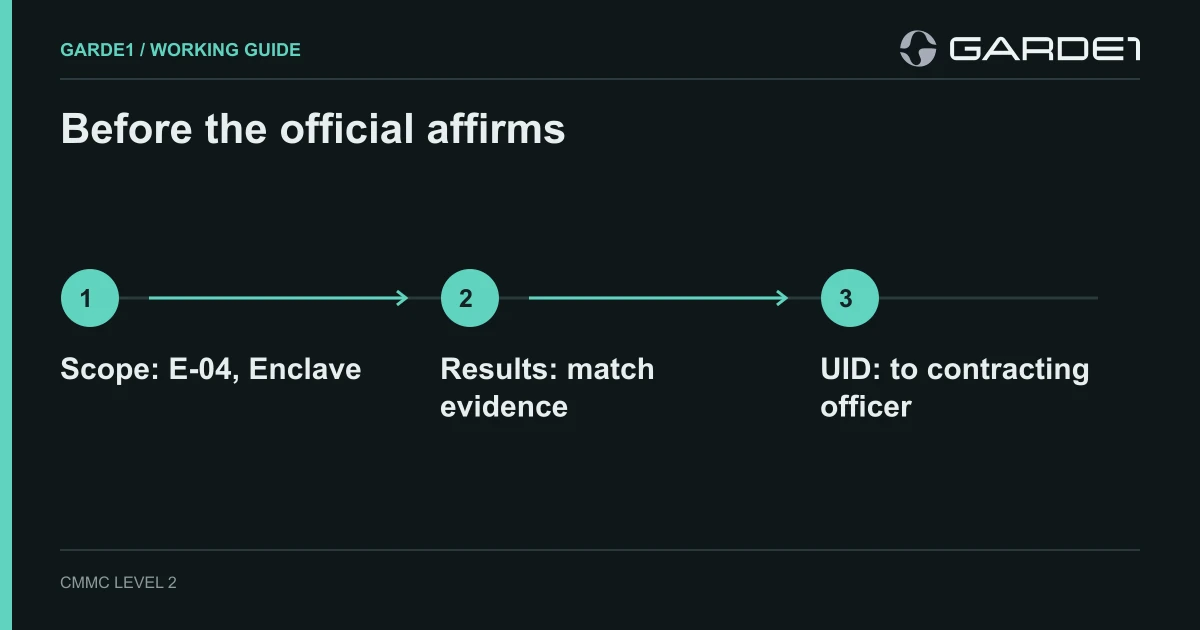
While you wait, put four things side by side:
- The scope statement, naming what you assessed. For example: "Engineering E-04: the Microsoft 365 tenant, workstations ENG-01 to ENG-07, the file server." Setting scope →
- The results, with met, not met, or not applicable for every requirement, and the evidence behind each answer. For requirements your cloud provider handles, that evidence is its customer responsibility matrix.
- The SSP, with its version number and date. Without it there is nothing to submit. The rule says a missing SSP means the assessment "could not be completed" (32 CFR 170.24).
- The affirming official's email address.
At the keyboard
This is for the person doing the entry. The steps follow the SPRS Level 2 Self quick-entry guide (v4.0, February 2025) and SPRS's own tutorial.
- Log in at piee.eb.mil, open SPRS, then Cyber Reports (CMMC & NIST).
- Pick your company from the hierarchy drop-down. Your CAGE shows first, with the top-level owner (HLO) in parentheses. An asterisk means you have the Cyber Vendor role for it. Click Run Cyber Reports.
- Start the record. Open the CMMC Assessments tab, then CMMC Level 2 (Self), then "Add New Level 2 CMMC Self-Assessment." Read the statement and click Acknowledge. If you can't see the Add New button, your role isn't approved yet.
- Answer every requirement. The 14 requirement families run across the top of the page. For each requirement, choose Met, Not Met, or N/A from your results. The Requirement Objectives button shows the smaller checks inside each requirement. Use Save and Continue to move between families; clicking a family name in the bar skips the save.
- Watch the three special ones. Multi-factor login (3.5.3) and encryption (3.13.11) open extra questions, because both can earn partial credit. The System Security Plan (3.12.4) can only be Met or Not Met. N/A isn't offered.
- Review. SPRS won't continue while any answer is blank and highlights the missing ones in red. The Export button on this screen sends a copy to the Download module. Take the export and file it with your packet.
- Fill in the details. Enter the assessment scope and choose Enclave (part of the company) or Enterprise (the whole company). Enter your employee count as your headcount, not the number of accounts or laptops. Then tick the included CAGE codes with Open CAGE Hierarchy, or paste them as a comma-separated list.
- Read the result. SPRS calculates the score and status, explained below. If it qualifies, you'll see Continue to Affirmation. If it doesn't, save the record and come back after the fixes.
- Hand it to the official. If you aren't the affirming official, enter their email and click Transfer to AO. They open the record, review it, tick the box certifying the affirmation statement, and click Affirm.
What the score screen is telling you
A perfect score is 110. Every requirement marked Not Met subtracts 1, 3, or 5 points, depending on how much damage its absence could do (32 CFR 170.24). Multi-factor login costs 3 points if you've only covered remote and administrator accounts and 5 if nobody has it. Encryption costs 3 points if it isn't FIPS-validated and 5 if there isn't any.
SPRS will only let you affirm two outcomes (quick-entry guide, 3.5). A score of 110 is a Final status, good for three years with an affirmation every year. A score from 88 to 109 is a Conditional status, good for 180 days while you close the gaps. And there's a trap: if any open requirement isn't allowed on a plan of action (the POA&M), SPRS shows "No CMMC Status" regardless of the number. That includes anything worth more than 1 point (non-FIPS encryption is the one exception), the SSP, and the physical access requirements. A 104 can be worth nothing. Which status you can claim → and how the scoring works →
Records that are incomplete, waiting for the official, or showing No CMMC Status stay invisible to the government. Contracting officers only see affirmed Conditional and Final records.
The check before anyone clicks Affirm
Before step 9, hold the draft entry against the packet. These are the four mismatches we see most often:
| Packet | Draft SPRS entry | Fix | |
|---|---|---|---|
| Scope | Engineering E-04 | "Whole company," Enterprise | Enter E-04, choose Enclave |
| CAGEs | Two codes | One ticked | Tick the second in Open CAGE Hierarchy |
| Results | 3.3.1 audit logging Not Met | All Met | Enter 3.3.1 as Not Met |
| SSP | v4, September 2026 | Cover sheet cites v3 | Point the packet at v4 |
Each one, left in, becomes a statement to the government that your own evidence contradicts. The affirming official should see this table filled in before they click anything. If a wrong record already went in, read what to do about an unsupported score before you touch it.
After you affirm
Send the UID to the contracting officer. Each affirmed record gets a CMMC UID, a 10-character code SPRS assigns to that assessment. The CMMC clause requires you to give the contracting officer the UIDs for the systems that will handle FCI or CUI on the contract, and to tell them if the UIDs change (class deviation 2026-O0025, 252.204-7021(e)). You'll find it behind the Detail button in the UID column, which also has a Save As PDF option. Save that PDF with the packet.
Put the dates on a calendar. Your status date is the day you submitted to SPRS. If you start Conditional and close out later, the Final status keeps the original Conditional date, so the three-year clock doesn't restart (32 CFR 170.4). A Conditional status has to be closed within 180 days: fix the open items, re-assess them, post the results, and affirm again. Miss the date and the status expires. Expired records turn to "No CMMC Status (Expired)" and disappear from the government's view, which means the contracting officer can't exercise your next option. Then affirm every year until the next full self-assessment, due three years from the status date. The annual affirmation →
Keep the evidence for six years. The rule requires you to retain the artifacts behind the assessment for six years from the status date (32 CFR 170.16). Save the SPRS export and UID PDF next to the packet version they came from.
Know the difference between Cancel and Delete. Delete removes the record for every CAGE included in it. Cancel leaves it visible in red, marked "Retracted by Vendor." If you find an error after affirming, talk to counsel before you use either.
What a wrong entry costs
SPRS takes your word. The Justice Department checks it later. In March 2025, MORSECORP, a Cambridge, Massachusetts defense contractor, agreed to pay $4.6 million to settle False Claims Act allegations (DOJ press release). It had posted a score of 104 in January 2021. A consultant it hired scored it at −142 in July 2022. It didn't update SPRS until June 2023, three months after the government served a subpoena. The case was brought by a whistleblower, who received $851,000.
The government can also check you directly. DoD's assessors at DCMA can run their own Medium or High assessment of your 800-171 implementation, and their result overrides your self-assessment (class deviation, 252.240-7997).
Record the findings accurately. A score of 86 cannot be affirmed as a CMMC Level 2 self-assessment: it is below the 88-point threshold for Conditional status. Keep any separately required NIST SP 800-171 Basic Assessment record accurate; that is a different SPRS entry and does not establish CMMC status. Fix the gaps and re-assess before claiming Conditional or Final status, and check that every remaining open requirement is POA&M-eligible.
Common questions
How long does the SPRS entry take? About an hour, if the assessment is finished and the results are in a spreadsheet next to you. The PIEE role approval before it can take several business days, so request it first.
Who should be the affirming official? A senior person with authority over the company's compliance, usually the owner or an officer. They certify that the company has implemented and will maintain every requirement for the systems in scope. Pick someone who will read the packet before signing.
Can my MSP or consultant submit it for us? They can help do the assessment. The affirmation is the company's statement, made by your senior official, and the role and the risk stay with you.
What if we score below 88? SPRS will calculate it but won't offer affirmation. Save the record, fix the highest-value gaps first, and re-run the assessment. A contract that requires Level 2 (Self) can't be awarded to you until you have a Conditional or Final status.
Can we edit the record after we affirm? Some status types can be edited, cancelled, or deleted by a Cyber Vendor User, shown by a pencil, an X, or a trash can on the record. Edits to an affirmed record are a new statement to the government, so treat them with the same care as the first entry.
Who do we call when SPRS won't cooperate? The SPRS help desk at [email protected], Monday through Friday, 6:30 a.m. to 6:00 p.m. Eastern. Questions about how to interpret a requirement go to DoD's CMMC inquiries mailbox, listed in the tutorial.
Walk in with the answers
The SPRS screens are the easy part. The hard part is having a scope, an SSP, and 110 answers that agree with each other and with the evidence. Garde1's mock assessment scores all 110 requirements against evidence from your tools and the records you add, computes the SPRS score, flags anything that blocks a Conditional status, and compares the score you've posted with the one your evidence supports. You copy the results into SPRS, and the affirming official signs something they've actually checked.