
Updated September 29, 2026
When two plants share the same logins, the same backup server, and the same IT provider, they get assessed together. The owner of this 120-person company asked whether he could certify only Plant B, where the defense work runs, and save the cost of assessing Plant A. The honest answer was no.
Here's why. CMMC, the Defense Department's cybersecurity certification for contractors, inspects everything that handles the customer's controlled files and everything that protects those things. At this company, the admin accounts that manage Plant B also manage Plant A. Both plants sign in through one Microsoft 365 account (a "tenant," with logins run by Entra, Microsoft's account system). The same backup server holds both plants' files, and the MSP (managed service provider, the outside IT firm) reaches both through the same remote-support tool.
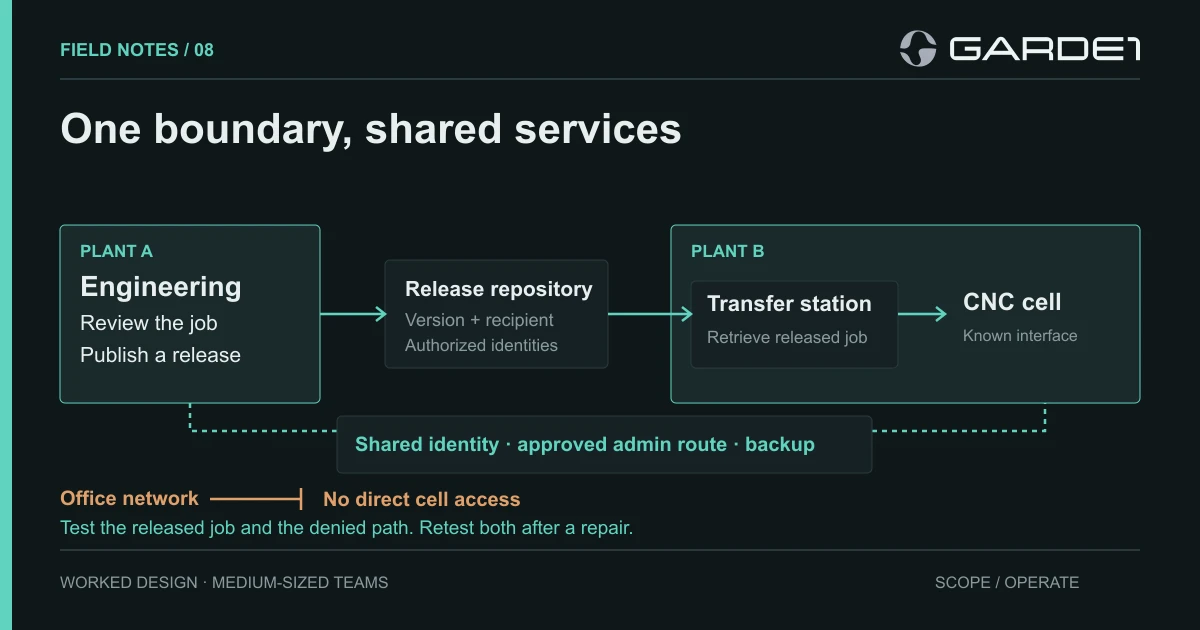
Those shared services are what the rules call Security Protection Assets. They're in scope and get assessed on the jobs they perform (Level 2 scoping guide). Each one touches both plants, so both plants sit inside one boundary, separated into network zones. Pulling them apart would take separate admin accounts, separate backup, and a separate support route. For a company this size, that means building a second IT department to save one assessment. If the plants are separate legal companies with their own CAGE codes (the IDs the government registers each business location under), the math changes; read the multiple CAGE codes guide first.
Every shared job gets one owner
Once you accept one boundary, the work that matters is ownership. Shared services fail assessments in a particular way: each plant assumes the other one, or central IT, is handling it. We gave every shared job one named owner and decided what each plant contributes. Doors and visitor logs at the two buildings follow the same idea, which the physical controls guide walks through.
| Shared job | Owner | What each plant does | What you keep |
|---|---|---|---|
| Admin accounts | Central IT lead | Each quarter, the plant manager signs off the list of admins | Signed list, removals |
| Remote support by the MSP | Central IT runs the connection; the plant lead approves each session | The MSP works only on the machine named in the ticket | Ticket, approver, start and end times |
| Backup | Backup owner | Each quarter, an engineer from each plant opens a restored job | One restore result per plant |
An assessor files these under least privilege and separate admin accounts for daily work (3.1.5 and 3.1.6, checked in Entra under Roles and administrators), remote maintenance with multi-factor login and sessions closed when done (3.7.5), and protecting backup copies (3.8.9).
The backup row causes the most trouble. A test restore of the office share proves the office share restores. It says nothing about Plant A's engineering project or the released machine program Plant B needs to cut a part. Restore one real job per plant, every quarter.
Files move from Plant A engineering to Plant B's machines the way they do in the CNC field note: released jobs go into one controlled storage location, a single transfer computer at Plant B picks them up, and nothing in the Plant B office can reach engineering. Plant B operators receive the released job and nothing else.
What the acquisition brought with it
Last year the company bought a six-person engineering firm. That firm is where the real gaps were, as is common after an acquisition.
Two applications still read from the firm's old file server, OLD-FILES-01. Nobody had included it in scope, because everyone thought of it as "the old server." The firm's remote-support tool was also still installed on every machine that came over in the deal, and the MSP didn't know it existed. A remote-access tool nobody monitors fails the requirement to control remote access (3.1.12), which is worth 5 points in the DoD Assessment Methodology. It's also exactly the kind of door an attacker looks for.
We wrote a retirement condition for each leftover and kept both in scope, in the security plan and the SPRS score alike, until the condition was met. OLD-FILES-01 retires when both applications open their migrated projects, the project history has been copied, one restore from the new location works, and the server is powered off. The support tool retires when Intune's installed-software report shows zero installs (Apps → Monitor → Discovered apps, Microsoft). That report refreshes about every seven days per device, so check it again a week after the uninstall.
The migration project had been marked complete once everyone's email moved to the new domain. That milestone had nothing to do with either retirement condition.
Download the two-plant flow and test record. The scope guide covers how shared services land in the boundary.