
Updated September 29, 2026
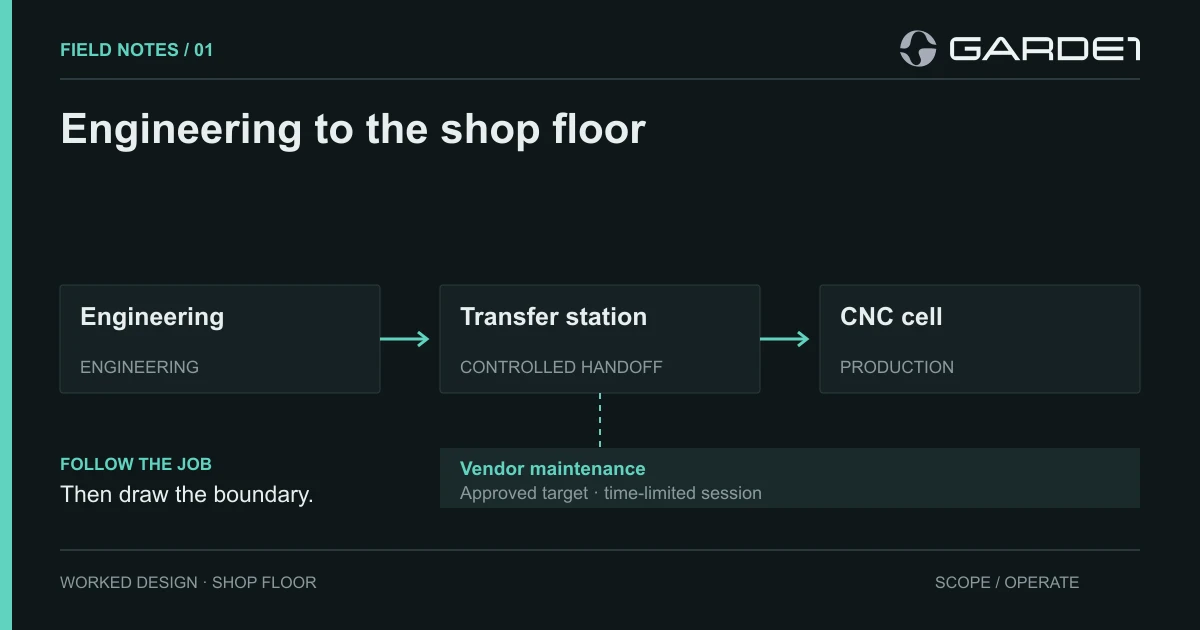
Send every program to the machines through one dedicated PC, give office computers no path to the machines at all, and let the machine builder's technician in only through a timed session with a second login factor. Do those three things and your CNC controllers stop being a security problem you can't fix, and become a documented exception the rules already allow for.
This note covers the network. For every other stop a drawing makes in a shop, from the inbox to the plater, see CMMC for a machine shop. The shop here is typical. It has an office, two CAM workstations where programmers turn drawings into toolpaths (ENG-03 and ENG-04), and six CNC controllers running whatever old Windows the machine builder shipped. There's also a vendor remote-access tool that someone installed in 2019 and nobody has touched since. The drawings and setup sheets are CUI (controlled unclassified information: technical data the government marks as sensitive), and everything, office and floor, sits on one flat network where any computer can reach any other.
That flat network is expensive. Defense contractors that hold CUI score themselves against 110 security requirements and post the result on the DoD's supplier website, SPRS, starting from 110 and losing points for each gap. The flat network fails the requirement to control what crosses your network's edges (3.13.1). The forgotten vendor tool fails two more: watching and controlling remote access (3.1.12), and requiring a second login factor for remote maintenance, with the session shut off afterward (3.7.5). Each is worth five points under the DoD Assessment Methodology, so this shop is at −15 before anyone asks about passwords. Fifteen points is most of the gap between a clean score and the 88 floor below which you can't post a passing status at all.
The rules we'd write
We add one small managed PC, TRANSFER-01 (this shop paid $900 for it), whose only job is handing released programs to the machines. Then we hand the network admin this table. Each row is a firewall rule: which part of the network may talk to which, and how. A VLAN is a walled-off section of one physical network, and SMB is ordinary Windows file sharing.
| From | To | Allow |
|---|---|---|
| Office VLAN | Controller VLAN | Nothing |
| ENG-03, ENG-04 | TRANSFER-01 | SMB to \released\, engineering group only |
| TRANSFER-01 | CNC-01 to CNC-06 | Each controller's own transfer protocol, one direction |
| Vendor | Maintenance gateway | Second login factor, named account, four-hour window you open by hand |
| Maintenance gateway | The machine on the ticket | That one machine and port |
The admin fills in the network addresses, and each controller's transfer method from its manual. When a transfer fails on day one, and one will, fix that single rule. Resist the urge to open the whole section and sort it out later, because later never comes. NIST's guide for small manufacturers works in the same order: list the equipment, draw the zones, trace what moves between them, then write rules (CSWP 28).
TRANSFER-01 now holds CUI, so it gets treated like any other computer that does. It's enrolled in your device management (MDM) tool, patched, running endpoint protection, backed up with encryption, and logging who opens which file. Clear \released\ when a job ships. Put the cell lead's name on setup sheets and USB sticks, and IT's name on the firewall. USB sticks fall under the requirement to control removable media (3.8.7), another five points. Buy two encrypted sticks and keep them in the cell.
Testing it with job J-104
Pick a harmless test program and a planned downtime window. Release J-104 from ENG-03 and confirm CNC-04 loads it. Then try the things that should fail, and keep proof that they did.
From the scheduling PC in the office, the admin runs Test-NetConnection CNC-04 -Port <transfer port> and saves the failed result next to the firewall rule that caused it. Have CNC-04 ask for CNC-05's folder and confirm the transfer station refuses. An hour after the vendor's window closes, have the vendor try to connect again. Keep the approval, the time the session ended, and the failed retry.
Then walk the floor. Look for a cellular modem the machine builder bolted inside a cabinet, a programmer's laptop with Ethernet and Wi-Fi both connected, and a USB stick that lives in someone's pocket. Each of those is a sixth route that doesn't appear in your table. Test only the specific connection you expect to be blocked, and keep network scanning tools away from running machines; an active scan can knock older industrial equipment offline (SP 800-82r3 covers why).
What goes in the SSP
The SSP, your system security plan, is the written description of how you protect CUI, and it's where the controllers get their exception. Machines like these count as operational technology, equipment that runs physical processes, and the CMMC rule treats them as Specialized Assets (32 CFR 170.19). They go in your asset list, your SSP and your network diagram, along with a description of how you manage their risk. At Level 2 they aren't assessed against the other security requirements, so nobody docks you for their missing antivirus. The rules above are most of what you need to say about them.
The Windows PC next to the machine that someone uses to check email gets no such pass. It's a normal CUI computer, and each machinist signs in to it as themselves. For an instrument PC that can't be patched at all, see the legacy lab field note.
Download the acceptance record and fill it in during the J-104 test.