
Updated September 29, 2026
For a three-programmer shop, we'd run three company-managed CAM workstations, keep customer defense models out of cloud CAD, and give the overflow programmer nothing until he's covered. The two office staff handle scheduling and invoices, never see a model, and stay out of it entirely.
The models are the point. A defense customer's 3D model is usually CUI (controlled unclassified information: the drawings, specs, and technical data the government marks as sensitive). Under CMMC, DoD's security program for its suppliers, every computer that touches CUI is "in scope" and has to meet 110 security requirements: encryption, multi-factor login, patching, backup, and records proving all of it. Every extra copy of a model on an unmanaged machine is a failed requirement waiting for an assessor, and a reason for the customer to send the next job elsewhere. It's the same problem a machine shop has from the inbox to the mill, one step earlier. So the first job is finding every copy.
Follow one job for a day
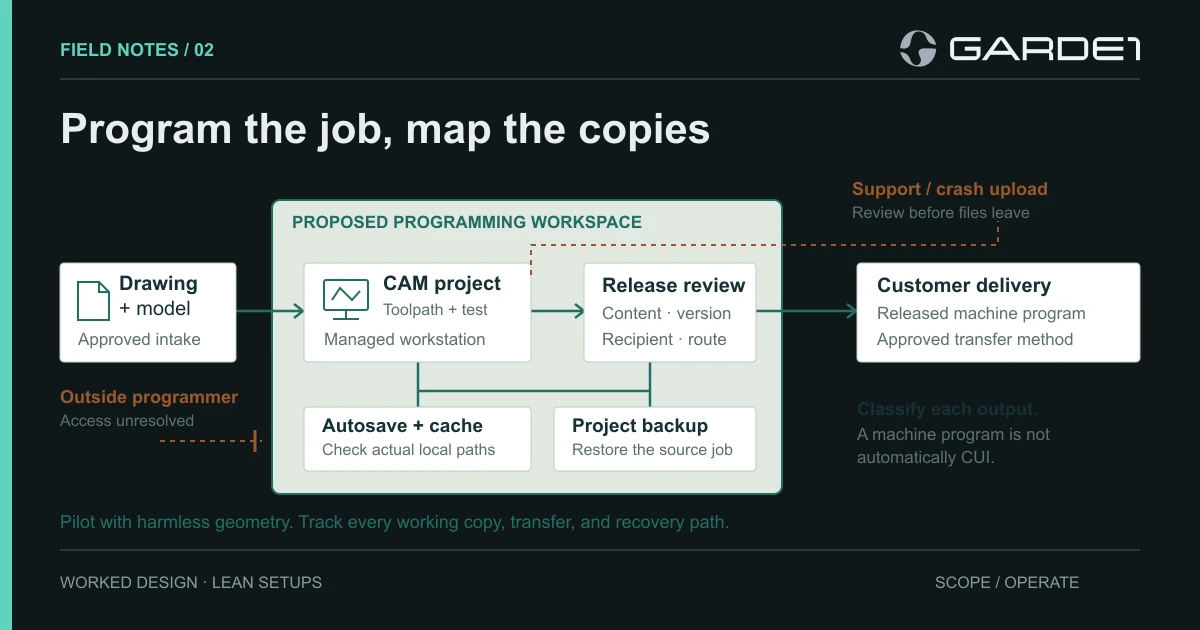
A customer model arrives Tuesday morning through the customer's file-transfer portal. The programmer saves it to the project folder on CAM-01, her workstation. That's the first copy. She opens it in the CAM software (the program that turns a 3D model into toolpaths for the machine), which starts autosaving every ten minutes. It doesn't autosave to the project folder. It saves to a hidden cache in her user profile that the backup doesn't include. That's the second copy, and nobody knew it was there.
Around eleven the software crashes. The recovery window offers to send a diagnostic package to the vendor. The package contains the geometry, and this is where the third copy nearly leaves the building. She clicks cancel because we told her to. Most people click send.
By three she has a finished program and a setup sheet in the delivery folder: the fourth copy. Getting that program onto the floor is its own problem, covered in the CNC shop segmentation note. That night the backup copies the project folder, the fifth. It doesn't copy the tooling library the project depends on, so a restore would bring back a job that won't open cleanly.
Five copies from one job, and two of them were outside the plan. Run the same day with a harmless test model before you buy anything. The fixes are three settings, and this is the note we'd hand whoever looks after the workstations:
Work order, CAM-01 to CAM-03: move the CAM autosave path into the project folder; add the tooling library to the nightly backup; turn off automatic crash-report uploads in the application's settings. Retest with the dummy model and keep the screenshots.
Real workstations, not virtual desktops, for this shop
CAM wants a real graphics card, a license locked to one machine, and steady performance. Three managed workstations need disk encryption, multi-factor login, patching, endpoint protection, and backup. That list is short and easy to price.
A virtual desktop (the software runs on a server; the programmer's computer only shows the screen) can keep the programmers' own computers out of scope, but only under a narrow rule. The computer may pass keyboard, video, and mouse and nothing else: no clipboard, no file transfer, no printing, no local copies (32 CFR 170.19). Price the graphics-card hosting, the storage, and the weeks of tuning before you compare that to three workstations. For most three-person shops, the virtual desktop loses. More on the virtual-desktop route
Cloud CAD and offline mode
Some programmers ask whether cloud CAD is fine if they work offline. Autodesk says plainly that Fusion is not ITAR compliant, even in offline mode (Autodesk). (ITAR is the export-control rule for defense articles and their technical data.) To work on a cloud design offline, Fusion first stores it in a local offline cache, and the work syncs back when you reconnect (offline mode). Offline mode pauses the sync; the design still lives in the cloud. For CUI jobs, use desktop CAM software that keeps files in your own project folder. If a vendor announces a local-data option, wait until it's in the version you actually run.
The overflow programmer
The overflow programmer works from home on his own laptop. If he gets the full model, his laptop becomes part of your CUI setup, and you know nothing about it. An NDA doesn't change that. You have two workable options. Bring him inside, with an account on a spare managed workstation or a keyboard-video-mouse-only virtual desktop. Or make him a subcontractor, with the DFARS 7012 security clause and your CMMC level written into his subcontract, working in his own assessed setup (scoping outside help). Until one of those is done, he waits.
If he only needs part of the design, ask the customer whether the reduced file is still CUI. Deleting the marking from the drawing doesn't answer that question.
This shop's decision record reads: local processing; CAM-01 to CAM-03 managed; project storage and backup include the tooling library; crash uploads disabled; overflow programmer on hold pending a flowdown. For where the project storage should live, see the Microsoft tenant guide. The scope guide shows how to draw the rest.