
Updated September 30, 2026
Google Workspace fully handles 42 of the 110 CMMC Level 2 requirements. By Google's own marking you share 58 and own 9, and one row is left blank. Those numbers hold only for Workspace Enterprise Plus with the Assured Controls Plus add-on, the one edition Google's CMMC guide covers.
CMMC Level 2 is the Pentagon's list of 110 security requirements for any company that holds CUI (controlled unclassified information: the drawings, specs, and technical data the government marks as sensitive). When a salesperson says Workspace "covers" CMMC, that is marketing language. Only the 42 are off your plate, and only if you set Workspace up the way Google's guide says. The other 68 still have your name on them.
Where the numbers come from
Google publishes a 176-page PDF called the Google Workspace CMMC Level 2 Configuration Guide, dated February 2025. It gives every requirement its own table, and each table has three boxes, Google, Shared, and Customer, with an X in one of them. Google says those X's come from its CMMC Customer Responsibility Matrix, the provider's list of who does which control (page 9). The guide's scope is "limited to the Customer's Google Workspace Enterprise Plus Edition and Assured Controls Plus environment" (page 7).
We counted every X. Here they are by family:
| Family | What it covers | Shared | You | No mark | |
|---|---|---|---|---|---|
| AC | Who can log in and what they can reach | 4 | 13 | 4 | 1 |
| AT | Security training | 0 | 3 | 0 | 0 |
| AU | Audit logs | 3 | 6 | 0 | 0 |
| CM | Settings and software control | 0 | 8 | 1 | 0 |
| IA | Passwords and multi-factor login | 3 | 6 | 2 | 0 |
| IR | Incident response | 0 | 1 | 2 | 0 |
| MA | Maintenance | 6 | 0 | 0 | 0 |
| MP | Media: drives, USB sticks, paper | 6 | 3 | 0 | 0 |
| PE | Physical security | 5 | 1 | 0 | 0 |
| PS | Personnel screening | 0 | 2 | 0 | 0 |
| RA | Risk assessment and scanning | 2 | 1 | 0 | 0 |
| CA | Security assessment and your SSP | 0 | 4 | 0 | 0 |
| SC | Network and encryption | 9 | 7 | 0 | 0 |
| SI | Patching and malware | 4 | 3 | 0 | 0 |
| Total | 42 | 58 | 9 | 1 |
The unmarked row is encrypting CUI on phones and tablets (3.1.19, page 35). The box is empty. Treat it as yours.
The count that tells you how much work is left
Google's "Shared" column is generous. For 15 of the 58 shared rows, Google's own text says "Google Workspace does not natively offer any features that, if configured correctly, will address this control" and tells you to handle it outside Workspace. Those 15 are all three training requirements, all four security-assessment requirements (including writing your System Security Plan, or SSP), personnel screening, three media-handling rows, the risk assessment, reviewing the security impact of changes, security-minded system design, and protecting CUI at alternate work sites.
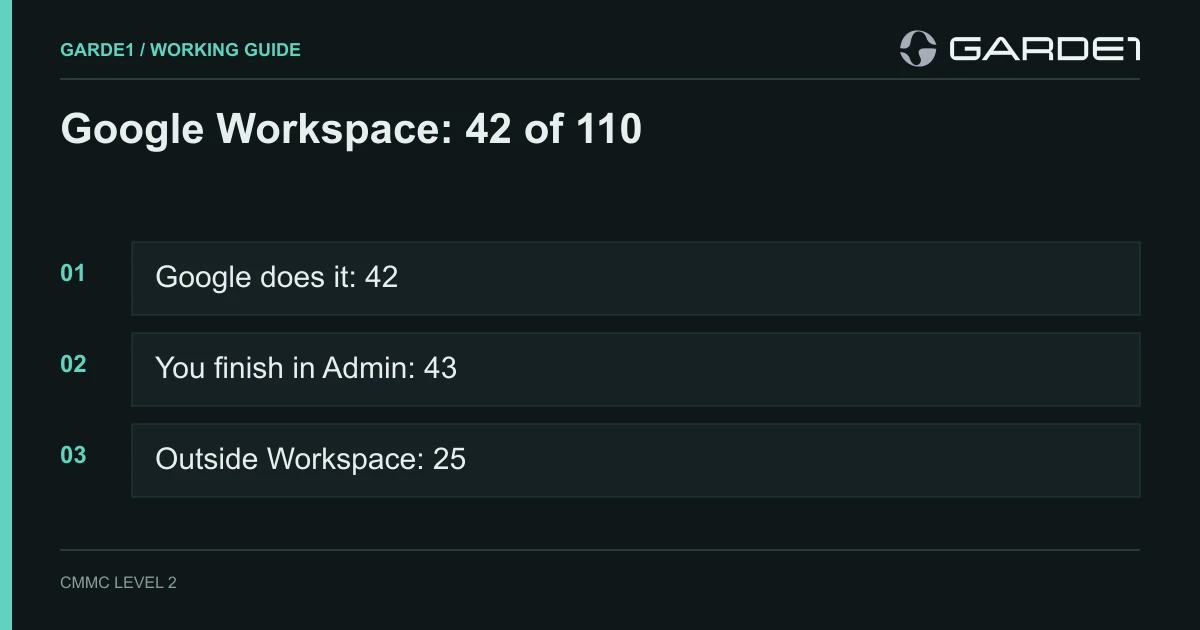
Read the guide that way and the 110 split three ways:
- 42 Google does. Its data centers, its servers, its encryption, its patching.
- 43 you finish inside the Admin console. Google built the feature. You turn it on, set it, and prove it's on.
- 25 you do entirely outside Workspace. Nine Google marks Customer, 15 it marks Shared with nothing to share, and the blank mobile row.
That last group is the one small contractors underestimate. It's paperwork, training, people, and laptops, and no Google license touches it. Your endpoint tool helps with the laptops, but CrowdStrike Falcon, for one, takes none of them off your plate.
Rows where Google does more than you think
Most owners assume "the cloud stuff" is theirs to prove. Much of it isn't.
Encryption. Google marks FIPS-validated encryption (3.13.11) as Google's (page 108). You don't buy an encryption add-on to protect CUI sitting in Gmail or Drive. One exception: if you turn on client-side encryption, the outside key service you run joins your scope, and that encryption becomes partly yours to prove.
Scanning and patching Workspace itself. Vulnerability scanning (3.11.2), fixing what the scans find (3.11.3), and patching (3.14.1) are all Google's for Workspace (pages 103–104, 111). Nobody expects you to scan Google's servers.
Malware in mail. Protection from malicious code (3.14.2) is Google's. Google scans every Gmail message for malware whether or not you change a setting (page 112). You don't need a separate mail gateway to meet this one for Gmail.
Maintenance. All six maintenance requirements are Google's. They describe who repairs servers and what happens to a drive sent out for service. For Workspace, that's Google's staff and Google's hardware.
Rows where you do more than you think
These are the ones that sink assessments.
Multi-factor login for everyone (3.5.3), shared. Google's part is multi-factor for its own staff on its own servers. Your part is enforcing 2-Step Verification for every user who touches CUI (page 62). "Allowed" and "enforced" are different settings, and only enforced passes. The pillar guide has the click path.
Keeping audit logs (3.3.1), shared. Google writes the logs. You decide how long to keep them and make sure they're kept (page 40). Workspace holds most admin, Drive, and login events for six months. If your audit policy says a year, you need an export running. If you can't run one, write six months into the policy.
Looking at the logs (3.3.5), shared. Google gives you the security investigation tool. Someone at your company has to open it on a schedule, look for odd sign-ins and admin changes, and write down what they found. Monthly is a defensible rhythm for a small shop.
Third-party apps (3.1.20), shared. Google's guide notes that "by default, users are permitted to access any third-party apps" (page 36). Every "Sign in with Google" app is a connection out of your CUI boundary. You list the ones you allow and block the rest.
Reporting an incident to DoD (3.6.2), customer. Google tells you about a breach on its side. Reporting a cyber incident to DoD within 72 hours, through DC3, is still your job under DFARS 252.204-7012. So is testing your response plan (3.6.3).
Your SSP and your training (3.12.4, 3.2.1), marked shared. Google checks the Shared box, then says Workspace has no feature for either. Google will not write a line of your SSP or train one employee. Plan both as 100% yours.
Physical security and media disposal. The five physical rows and media sanitizing (3.8.3) are Google's for Google's buildings and Google's disks. Your shop, your laptops, and the paper drawings on the inspection bench are outside that. Google puts it plainly under every inherited row: your boundary "may include systems, applications, facilities, or tools outside of Google Workspace." If CUI is printed or stored on a laptop in your building, the physical and media requirements come back to you.
What "inherited" requires before you can claim it
An inherited row only counts if an assessor can follow the chain. Three things make it hold:
- The edition in scope. Every person who touches CUI is licensed for Enterprise Plus with Assured Controls Plus. A user on a lesser license in the CUI group breaks the claim for that user.
- Workspace configured to Google's guide. Google's inherited rows assume you run the service as the guide describes, with only Google's FedRAMP-authorized services turned on for the CUI group.
- The matrix cited in your SSP. For each inherited row, your SSP names Google as the provider and points to the source. Google says the full matrix comes from your Google Workspace representative on request (page 10). Ask for it in writing and file it with your SSP.
The Customer Responsibility Matrix explainer walks through how to write an inherited row.
What changes on Business editions
The short answer: you lose the number. Google's guide doesn't cover Business Starter, Standard, or Plus, so there is no Google-published split you can cite in an SSP for those editions.
Three concrete things go missing. Assured Controls and Assured Controls Plus are sold only as add-ons to Enterprise Plus or Frontline Plus, so a Business account can't restrict Google support staff to US persons. Google's 72-hour incident commitment under DFARS 7012 applies only to customers "with properly-configured Assured Workloads and Assured Controls" (Google). And the security investigation tool, the Workspace feature Google points to for log review, isn't available on any Business edition.
Google's own pages also disagree on FedRAMP. The Workspace FedRAMP configuration guide lists Business Standard and Business Plus among its FedRAMP High editions. Google Cloud's FedRAMP and DoD scope page lists only Enterprise Plus, Frontline Plus, Business Continuity, and Business Continuity Plus. Business Starter appears on neither. We wouldn't put CUI on a Business edition. Keep those licenses for people who never open a controlled file.
What about Chromebooks?
Chromebooks get their own appendix in the same guide (pages 129–172), and it tells a different story. It lists 32 of the 110 requirements. Google marks 31 of them Customer and one Google: protection from malicious code (3.14.2), handled by Chrome Safe Browsing (page 171). The appendix also notes that most of its features "require Chrome Enterprise or Chrome Enterprise Premium," licenses bought separately from Workspace (page 129).
So a Chromebook adds almost nothing to the 42. Google hands you the settings: USB blocks, guest mode, sign-in rules. Setting them on the right group of users and testing them is yours. The pillar guide's Chromebook test shows how that goes wrong.
Common questions
Does Google Workspace meet CMMC? No product meets CMMC. Companies do. Workspace Enterprise Plus with Assured Controls Plus handles 42 of the 110 Level 2 requirements for you, and Google publishes a guide for the rest. Your company still passes or fails its own assessment.
Is Google Workspace CMMC compliant? Workspace can be part of a compliant setup. Google Public Sector holds its own CMMC Level 2 certificate for its internal systems, and Google says it "does not extend to customer environments." Your certificate comes from your own assessment.
Where is the Google Workspace CMMC customer responsibility matrix? Google's public CMMC guide shows each control's Google, Shared, or Customer marking. Google says the full matrix is available from your Workspace representative on request. Ask for it, and cite it in your SSP.
How many controls are fully my responsibility? Google marks 9 as Customer. Count the 15 shared rows with no Workspace feature and the blank mobile row, and 25 requirements sit entirely outside Workspace.
Does Microsoft cover more? Microsoft's CMMC placemat marks 52 as inherited for GCC High. See how many controls GCC High covers. For the rest of the field, PreVeil's matrix hands you 37 and AWS GovCloud's hands you 21.
Before you tell anyone Workspace "covers" you
Open the guide, find the 43 rows you finish in the Admin console, and put a name and a screenshot next to each one. Then list the 25 outside Workspace, starting with your SSP, training, incident reporting, and laptops. That list is your real CMMC project. The 42 are the part Google already finished.