
Updated September 29, 2026
A security baseline is a written list of the settings every computer in a group must have, such as "disk encrypted" and "screen locks after 10 minutes," with a version number and an owner. You apply it by testing it on a few machines, rolling it out, and then checking every machine, counting only the ones where you can see the setting actually took.
It matters because an assessor counts laptops, not intentions. Under CMMC (the Defense Department's cybersecurity certification for contractors), an outside assessor will pick machines and ask you to show the settings on them. One laptop where encryption quietly switched off is enough to fail the requirement, and a failed requirement costs points on the score your contracts depend on. Two requirements from NIST SP 800-171 Rev. 2 cover this: write the baseline down (3.4.1) and make the machines follow it (3.4.2) (NIST SP 800-171A).
Here's how we'd do it for twelve Windows engineering laptops, ENG-01 through ENG-12.
Write it down so someone else could apply it
Call it ENG-WIN-01, version 1. The person who manages the laptops owns it, and the IT lead approves it. It names the exact Windows version, the approved versions of each application, and the device-management profile that pushes the settings out. "Latest" isn't a version.
| Setting | What it must be |
|---|---|
| Disk encryption | BitLocker (Windows' built-in disk encryption) on and actively protecting the main drive |
| Recovery keys | Stored in Entra ID, Microsoft's account system; only two named admins can retrieve them |
| Daily account | Engineers aren't administrators on their own laptops (3.1.6) |
| Idle lock | Screen locks after 10 minutes and needs a sign-in to resume (3.1.10) |
| Antivirus | Microsoft Defender policy applied and healthy |
| Software | Installed versions match the approved list |
You pick the idle time yourself; the requirement leaves it to you. Ten minutes is our choice, so write the same number into the policy and the laptop settings. Encryption alone doesn't meet 3.13.11, which requires encryption software the government has tested and certified (called FIPS-validated), so record which encryption method you use and its certification separately.
Test on three laptops first
Pick a normal engineering laptop, the one running the oldest mix of applications, and a loaner. Apply the settings, then do real work as an ordinary user: open a model, save it, leave the laptop idle, unlock it with the recovery key. You're checking two things: the settings took, and engineers can still do their jobs.
ENG-01 and ENG-02 pass. On ENG-03, a CAD plugin update needs an administrator to install. The IT admin installs it the managed way, and the engineer repeats the job as a normal user. Everyone keeps a non-admin account. The shortcut, making every engineer an administrator to fix one installer, would fail 3.1.6 on twelve machines at once.
Count what you can see
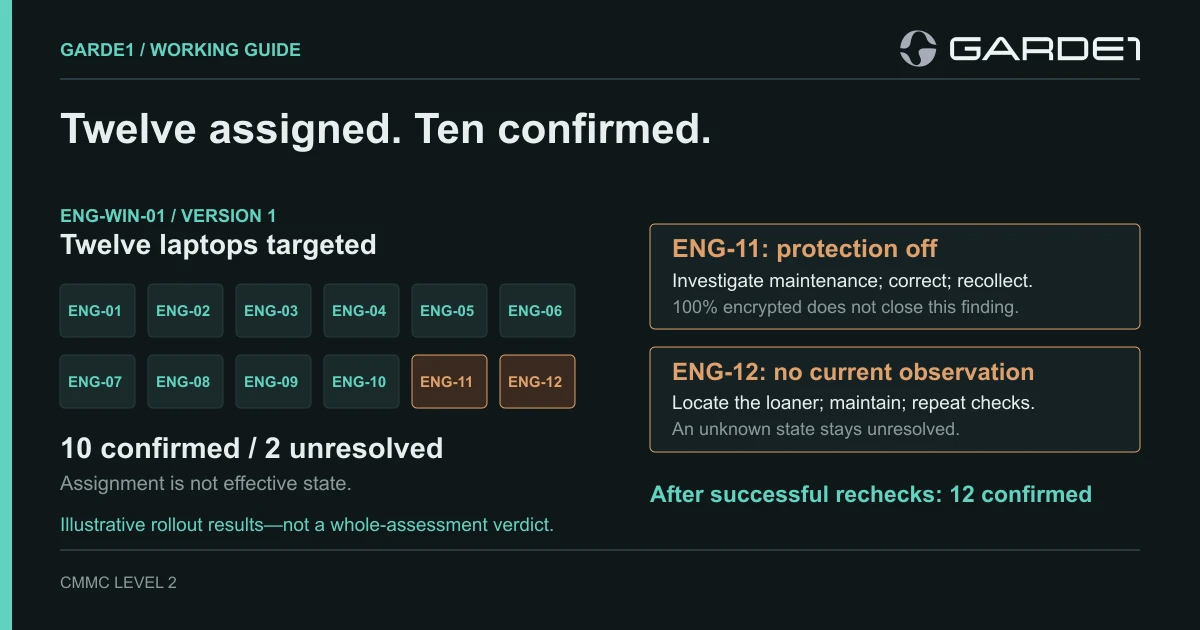
After rollout, the device-management console says the settings are "assigned" to all twelve laptops. Assigned only means the settings were sent. An assessor counts the laptops where you can show the setting in effect.
The admin checks each laptop. Ten pass everything. ENG-11 shows its disk 100 percent encrypted with protection switched off: someone paused BitLocker for a firmware update and never turned it back on. A paused disk isn't being protected (Microsoft's BitLocker operations guide), and a screenshot of "100% encrypted" won't close it. ENG-12 hasn't reported in at all.
So the honest count is ten confirmed and two open, not twelve. The admin turns protection back on for ENG-11, checks again, and saves the result with the time, the laptop name, and the change ticket. ENG-12 turns up in the loaner cabinet, gets powered on and updated, and is checked before anyone takes it. If it had been retired, you'd record that and count eleven, rather than quietly deleting its row.
When one laptop has to be different
Write one exception line per laptop: which setting differs, why, who approved it, what makes up for it, and when it gets looked at again. "ENG-07 runs CAD release B instead of A for a customer compatibility trial, approved by the project lead, reviewed before the next project starts." An exception records a decision. It doesn't turn a failed requirement into a passed one. When software or settings change, publish version 2, test it the same way, and keep version 1 on file so older records still make sense (NIST SP 800-128).
The commands behind the count
This part is for whoever runs your laptops. The check is read-only and can be run on each laptop, or the same fields can be pulled from Intune (Microsoft reference):
Get-BitLockerVolume | Select-Object MountPoint, VolumeStatus, EncryptionPercentage, ProtectionStatus, EncryptionMethodA passing laptop shows VolumeStatus FullyEncrypted and ProtectionStatus On. ENG-11 showed FullyEncrypted and Off. Once the firmware work is confirmed finished, Resume-BitLocker -MountPoint C: fixes it; rerun the check and save the output. For the idle lock, leave a laptop alone for 11 minutes and try to use it. For admin rights, compare each laptop's local Administrators group with the approved list. Recovery keys never go into an evidence file.
Garde1 reads each laptop's disk encryption, last check-in time, and the per-setting status of every policy the laptop reports from Intune (FileVault, last contact, and profiles from Jamf on Macs), so the mock assessment works from what the laptop says, not what the console assigned.