
Updated September 29, 2026
If your MSP, the outside IT company that runs your computers, already uses Microsoft's tools for its other customers, put your Macs on Intune with Defender for Endpoint. If your own team already runs Jamf well, keep Jamf. The best pair of tools is whichever one a named person will actually watch. A second console that nobody opens protects nothing, and you'd be paying for it every month.
Every Mac that touches controlled drawings needs two kinds of software. One is device management (MDM): it enrolls the Mac, pushes settings like disk encryption and screen lock, and reports whether each setting stuck. Intune and Jamf Pro are the common choices. The other is endpoint protection, the modern form of antivirus that also watches for attacks and raises alerts: Defender for Endpoint, Jamf Protect, or CrowdStrike Falcon. CMMC, the Defense Department's security program for suppliers, requires malware protection (3.14.2) and enforced security settings (3.4.2) on every computer that handles CUI (controlled unclassified information: drawings and technical data the government marks as sensitive). These two tools are how most shops meet those requirements, and CMMC expects you to prove each machine is actually covered. One unprotected laptop that can still open the project files is a finding an assessor will write up.
First, where does your CUI live?
This part is for whoever set up your Microsoft account. If your CUI sits in Microsoft's government clouds, GCC or GCC High, run device management and endpoint protection in that same government tenant (your company's account). Both Intune and Defender for Endpoint are available in GCC High, and both support Macs there (Defender for US Government, Intune Government). Some Defender features arrive there later than in the commercial version, so read Microsoft's gap list before you promise anyone a specific dashboard. For Jamf or CrowdStrike, look up the exact product on the FedRAMP Marketplace, the government's list of cloud services approved for federal data. Then ask the vendor in writing what device data, diagnostics and file samples leave your environment.
Choosing
| If this is true | Run | Rethink when |
|---|---|---|
| Your MSP already runs Microsoft | Intune + Defender for Endpoint | Mac app installs keep needing hands-on fixes |
| Your team knows Jamf and likes it | Jamf Pro + Jamf Protect | No one is assigned to answer alerts |
| Your security provider runs CrowdStrike | Intune or Jamf Pro + Falcon | The quote doesn't include responding to alerts |
People often assume Jamf Protect requires Jamf Pro. It doesn't. Jamf lists Intune, Workspace ONE and others as supported ways to deploy it (Jamf Protect MDM requirements). So Intune plus Jamf Protect is a reasonable pair if that's what your people know.
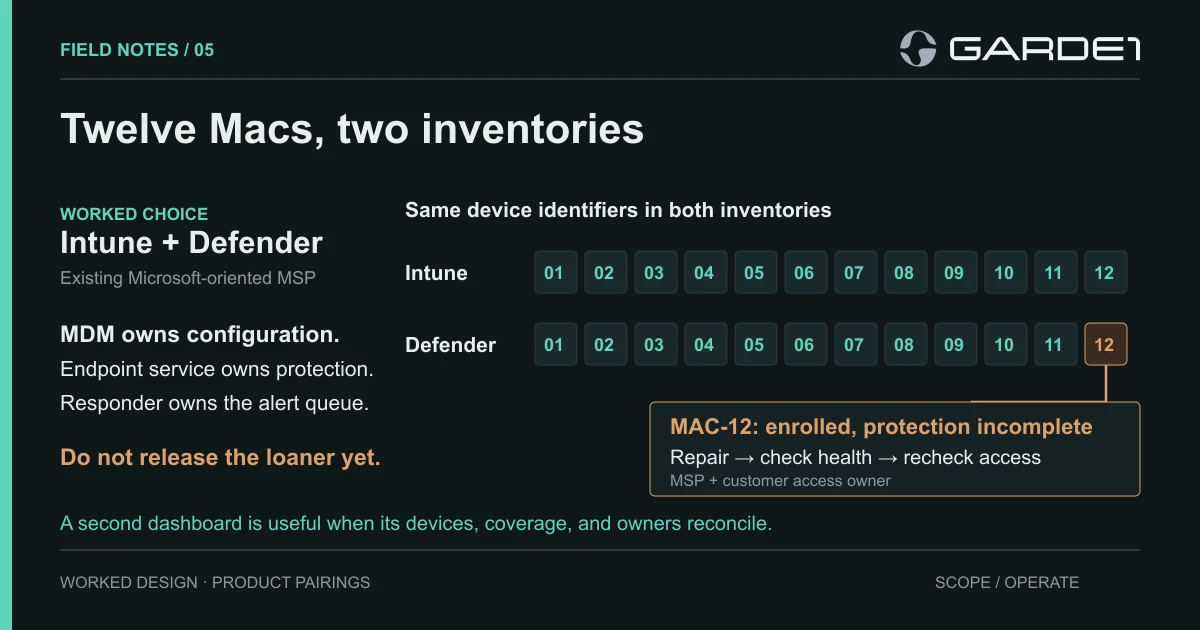
For the twelve Macs in this example, we chose Intune and Defender. The MSP runs both for thirty other clients, so the Macs landed in a queue someone already watches.
When the quote arrives, ask for separate lines for licenses, enrollment, policy setup, ongoing maintenance, alert triage, escalation and setting up replacement Macs. Get the response hours in writing, along with the name of whoever answers at 2 a.m. Some services collect alerts and leave the investigating to your staff. That's fine if the contract says so and your staff know it; a customer responsibility matrix is where that split gets written down.
The count that found MAC-12
From here on it's the admin's checklist. The owner needs one fact from it: installing the software doesn't prove it's working, and the only proof is two lists that agree.
Setting up Defender on a Mac takes more than pushing the app. Microsoft's guide covers several settings packages first (system extensions, Full Disk Access, network filtering, background services and notifications), then the app, then connecting it to Defender. A Mac can show a successful install in Intune and still be unprotected (Deploy on macOS with Intune).
So we exported both inventories and matched them by serial number. Intune showed twelve enrolled Macs. Defender showed eleven. The missing one was MAC-12, the loaner, which had been enrolled but never added to the group that receives the Defender settings. On the loaner, mdatp health reported healthy : false and full_disk_access_enabled : false (troubleshooting). One detail tripped us up: Full Disk Access granted through device management doesn't appear in System Settings on the Mac. An empty list there doesn't mean the grant failed. Check mdatp health instead.
MAC-12 could also still open the project site. We added a device-health requirement to the site's Conditional Access policy, the Microsoft rule that decides who may sign in from which devices, so an unhealthy Mac is now refused. We then sent a test alert, and it went to a shared mailbox nobody reads. The MSP assigned a named responder, and we repeated the test until someone acknowledged it.
After the fixes, twelve Macs appear in both inventories and all show healthy. The loaner was refused while it was unhealthy and allowed once it recovered, and the alert has a person on the other end. For each Mac, keep the serial number, settings version, mdatp health output and timestamp together. That set is your evidence; a screenshot of the Defender icon in the menu bar isn't.
Neither product restores a lost file, so give backup its own owner. Run every replacement Mac through the same serial-number check before it's allowed near the project. Personal Macs are a separate question, covered in the guide to personal devices and CUI.